How JavaScript Works in the Web Browser
Before you can really understand JavaScript, it helps to know where it actually lives and how it runs. Not just "it runs in the browser", but what's actually happening under the hood when your code executes.
How the Browser is Structured
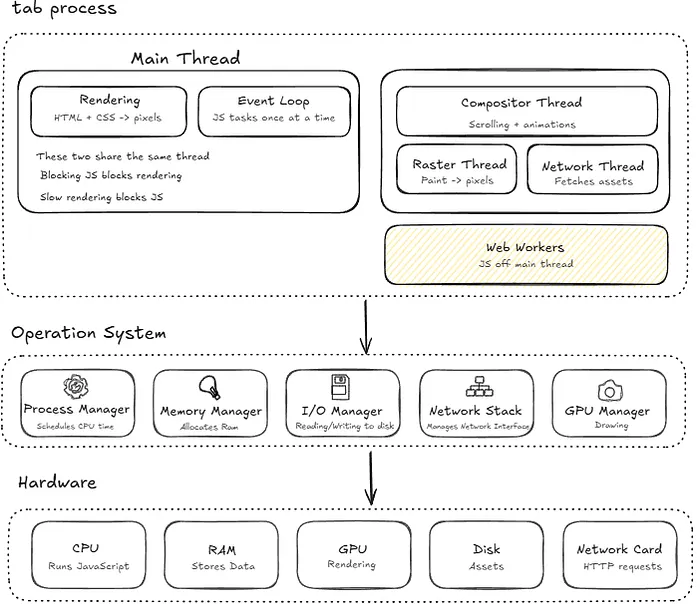
Each browser tab generally runs in its own process, though in practice the browser may share or reuse processes depending on memory constraints. That's why if one tab crashes, it doesn't bring down the rest.
If you want to understand how the browser is structured around that, I covered it in a previous article.
How JavaScript Connects to the Page
The main purpose of JavaScript was to attach to DOM elements and listen to events. We can add JavaScript to a project by adding an inline <script> tag directly into the HTML, or we can have an external script file and import that.
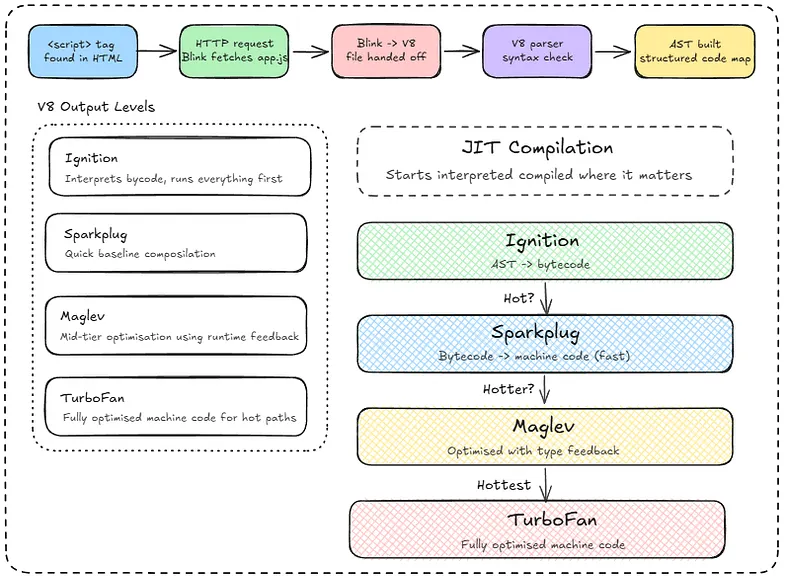
When the browser encounters an external script tag, Blink (the rendering engine) spots the src attribute and fetches the file from the server. It sends a network request to download app.js, the same way it would download an image or a CSS file. Once it arrives, it hands it off to V8 (the JavaScript Engine) to actually execute it.
So Blink is the one doing the fetching whilst V8 is the one doing the running.

JavaScript Execution Pipeline
JavaScript is described as an interpreted language, but that's only half the story.
When you write Java, you run a compiler that takes your source code and produces a completely separate .class file that gets run by the Java Virtual Machine. As that file exists on its own, you could delete your original code and the compiled file would still work fine.
JavaScript doesn't work like that and there's no separate output file, no compilation step beforehand. This means that when you write a .js file, the browser picks it up and runs it directly as it goes.
But it's not purely interpreted either. Here's what actually happens inside V8 when your code arrives:
- The internal V8 parser reads your code and builds an Abstract Syntax Tree (AST).
- The AST gets handed to Ignition, V8's interpreter, which converts it into bytecode and starts executing it.
- If a function gets called frequently enough, Ignition flags it as hot and promotes it to Sparkplug, V8's baseline compiler, which quickly compiles it to machine code without heavy optimisation.
- The hottest paths eventually reach TurboFan, V8's fully optimising compiler, which generates the most performant machine code possible.
That last part is what's called Just-In-Time (JIT) compilation. The code starts interpreted and gets compiled where it matters, and it's why JavaScript is fast enough to power complex applications despite being a scripting language.
V8 actually has four levels of output depending on how 'hot' something is:
- Ignition — interprets bytecode, runs everything first
- Sparkplug — quick baseline compilation, faster than interpreting
- Maglev — mid-tier optimisation using runtime feedback
- TurboFan — fully optimised machine code for the hottest paths
Everything ultimately ends up as binary running on your CPU.
The Abstract Syntax Tree
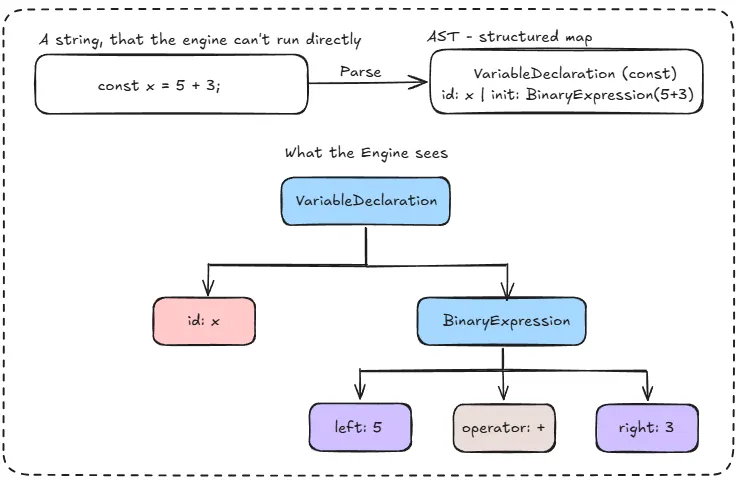
When V8 gets your JavaScript code, it's just a string of text. The engine can't run a string, it needs to understand the structure of it first. So it runs a parser that reads through your code and converts it into a tree structure called an Abstract Syntax Tree.
If you write:
const x = 5 + 3;
The parser doesn't see that as a line of text. It sees a variable declaration called x whose value is an addition expression between the number 5 and the number 3.
That structure, the relationships between all those pieces, is the AST. It's a map of your code that the engine can actually work with.
What are C++ bindings?
JavaScript can't talk to your hardware, file system, or network on its own. So when you write:
console.log('hello')
JavaScript itself has no idea how to print to a screen. What actually happens is V8 maps that console.log call to a pre-written C++ function that does know how to do it, as C++ is a lower-level language that can talk directly to the operating system.
So you're writing JavaScript, but under the hood it's constantly handing off the real work to C++ functions that were already compiled and ready to go. Those are also known as C++ bindings.
A simple way to think about it — you speak JavaScript, the computer speaks machine code, and C++ is the translator sitting in the middle doing the heavy lifting.
JavaScript is single threaded
JavaScript is single-threaded, meaning that only one thing runs at a time, in order. That's the call stack. Every function call gets pushed onto it, executed, and popped off, nothing else runs while that's happening.
The problem is that some things take time, such as a network request, a timer, or reading a file. If JavaScript just waited for those to finish, the whole page would freeze.
That's where the event loop comes in. When you call something like setTimeout or fetch, the browser handles it in the background. Your JavaScript keeps running. When the background task finishes, the callback gets added to the task queue. The event loop watches the call stack, and the moment it's empty, it picks the next task from the queue and pushes it onto the stack to run.
So JavaScript stays single-threaded, but it never actually sits and waits, it just comes back to things when they're ready.
The JavaScript Execution Environment
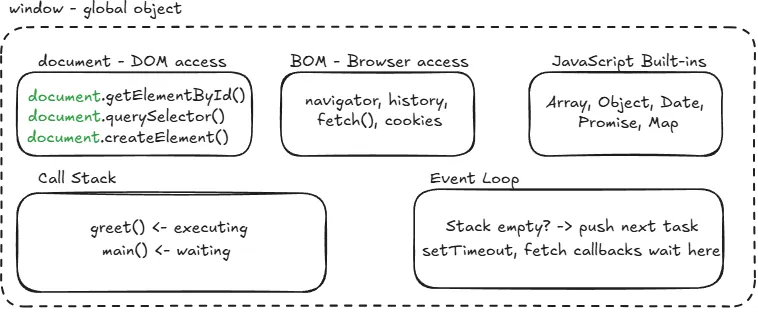
When a tab opens, V8 creates a JavaScript execution environment. This is what gives your code access to everything it needs.
You get three things injected into your global scope:
- The document object — how you talk to the DOM. When you call document.getElementById(), it goes through a C++ binding, reads the DOM data structure inside the tab process, and hands the result back to you.
- The Browser Object Model (BOM) — how you talk to the browser itself. Navigation, history, screen information. Navigator and History live here, as do Web APIs like fetch() which are provided by the browser, not the JavaScript language itself.
- JavaScript built-ins — everything the language ships with. Array, Object, Date, Promise, and so on. These are defined in the ECMAScript specification, meaning they exist in every JavaScript environment, not just the browser.
All of this lands on the window object, which is the global object in the browser. That's why you can write document instead of window.document — it's all sitting on window.
The call stack is what actually executes your code. Every function call gets pushed onto it and run. The event loop, on the other hand, decides what and when things get pushed to the call stack.
The event loop continuously checks if the call stack is empty, and if it is, it pulls the next task waiting in the queue and pushes it onto the stack. That's how JavaScript handles things like setTimeout or fetch callbacks without blocking the main thread, but that's a deeper topic for another article.

PS: This is based on my own research and understanding of how JavaScript works in the Web Browser. I'd always recommend double-checking other resources if you want to go deeper. I wrote this mostly for myself, but if it helps someone else along the way, that's a win. Thanks for reading.