How the Web Actually Works — From Typing a URL to Loading a Page
Despite working with it every day, most developers don't have a clear picture of what actually happens between typing a URL and seeing a page load. This article follows that journey step by step, and introduces the OSI (Open Systems Interconnection) model along the way.
The OSI (Open Systems Interconnection) Model
So what is the OSI model? It's a layered model of how communication between systems' works, broken down into 7 layers.
Well, why do we actually need 7 layers? Why can't this just be one big thing?
Think about what happens when something goes wrong. If it's all one big process, where do you even start looking? But when it's broken down into 7 layers, you know exactly where to look — is the server down? Is your Wi-Fi out? Are you being blocked from accessing certain data?
Each layer represents a specific step in the journey data takes from one computer to another.
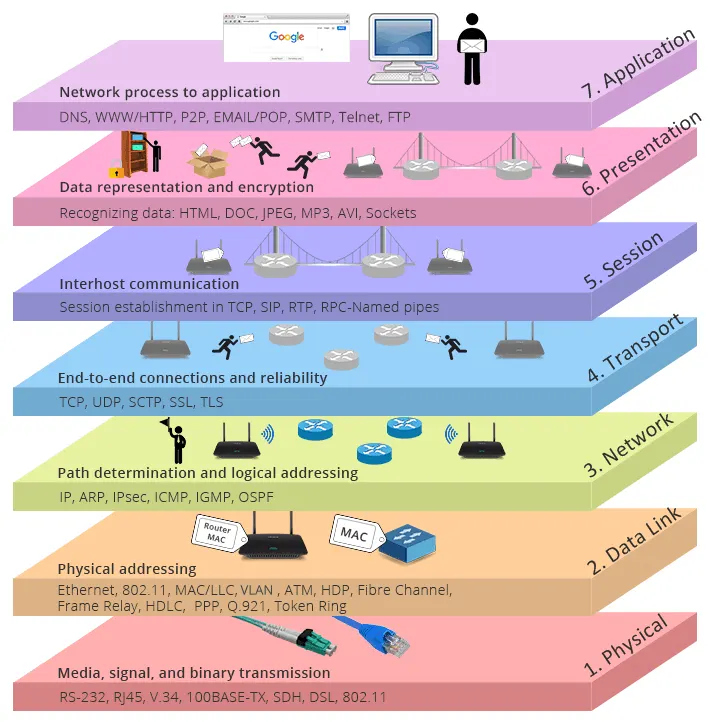
The OSI Model Diagram. Source:
https://tinyurl.com/2baxdk74
Now let's go through what this actually looks like in practice.
Step 1: Typing a URL
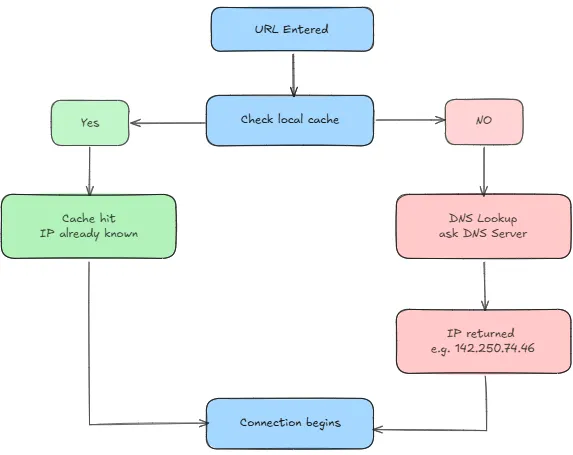
When you type a domain name like google.com into your browser, the first thing this does is to check its local cache and see if it has seen this address/domain before. If yes, it already knows the IP address and skips ahead. If not, it does a DNS lookup, basically asking a DNS server "what's the IP address for this domain?" and gets something back like 142.250.74.46.
DNS is an Application Layer (L7) protocol, but it is separate from HTTP, and the HTTP request is not created during DNS resolution. DNS only resolves the domain name to an IP address; the HTTP request is created later, after the IP address is known and the connection process begins.
Step 2: Finding the Right Port
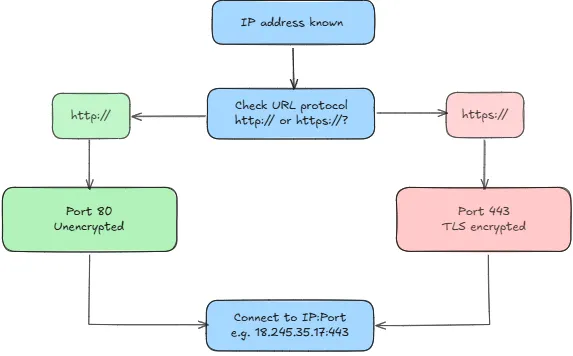
Now the browser has the IP address, it knows which building to go to. But a server can be running multiple services at the same time: a web server, a database, an email server, an internal API, so on and so forth. So it also needs to know which room to go to. That's what a port is, just a number between 0 and 65535 that directs traffic to the right process.
- http:// → uses port 80
- https:// → uses port 443
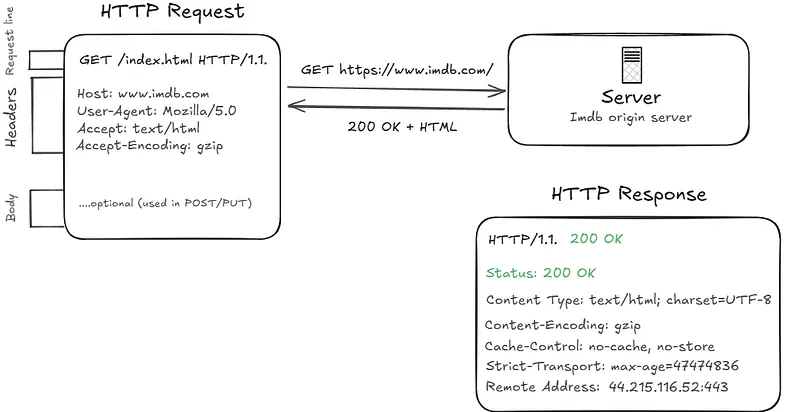
The browser handles this automatically. You never have to type :443, it just knows. If you're curious, you can actually see this yourself: open IMDb.com in your browser, go to DevTools → Network tab, filter by "Doc", and check the Remote Address on the main request. You'll see something like 18.245.35.17:443.
Step 3: The TCP Handshake
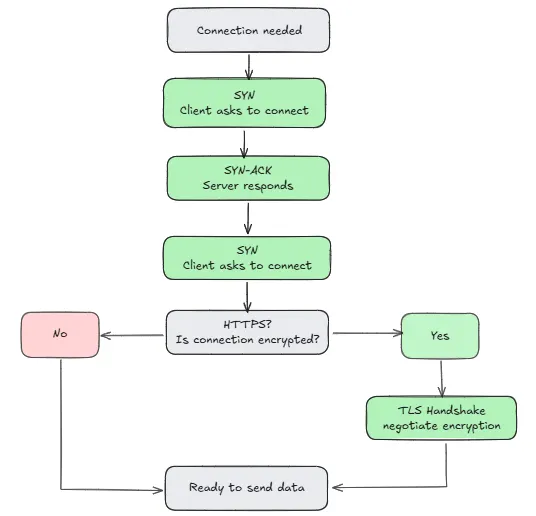
Before anything is sent, the browser and server need to establish a reliable connection. This is where TCP comes in and represents the Transport Layer (L4) of the OSI model which is responsible for breaking the data into smaller segments, making sure they arrive in the right order, and resending anything that goes missing.
The connection starts with a three-step handshake:
- The client asks to connect (SYN)
- The server responds (SYN-ACK)
- The client confirms (ACK)
Once the TCP connection is established, a TLS handshake may occur if HTTPS is being used. During this process, the client and server negotiate encryption settings, verify identities, and establish shared session keys before any HTTP data is transmitted.
TLS is often associated with the OSI Presentation Layer (L6) because it handles encryption and data representation concerns, although in practice it does not map cleanly to a single OSI layer and was designed independently of the OSI model.
Step 4: The HTTP Request
Now the browser sends an HTTP GET request, essentially a plain text message saying "give me this page."
GET / HTTP/1.1
Host: google.com
User-Agent: Mozilla/5.0
Accept: text/html
The server processes this and sends back a response with a status code (200 OK, 404 Not Found etc.) and the actual content which is usually an HTML document.
This is still the Application Layer (L7), the top of the OSI stack. HTTP only cares about what data needs to be sent, not how it gets there. The layers below it handle that.
Step 5: Packets — How the Data Actually Travels
The HTML doesn't arrive as one big file. Before it leaves the server, it gets broken into smaller segments at the Transport Layer (L4), the same layer that set up the connection. This matters because networks aren't perfectly reliable and if one segment gets lost, only that segment needs to be resent, not the whole thing.
Each segment then gets wrapped into an IP packet at the Network Layer (L3), which attaches source and destination IP addresses and handles routing, figuring out the path the data takes across the network to reach your machine.
IP Packet
└── IP Header (source IP, destination IP)
    └── TCP Segment
        └── TCP Header (port, sequence number)
            └── Actual data (chunk of HTML)
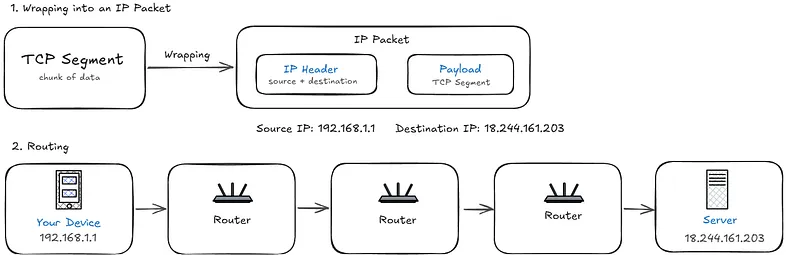
At the lowest level, the Hardware Layers (L1-L2) take over. This is where data becomes physical: electrical pulses over copper, light pulses through fibre, or radio waves over Wi-Fi. Devices on the same local network communicate using MAC addresses before the data gets handed off to the wider internet.
TCP's job on the receiving end is to reassemble everything in the right order.
Step 6: The Browser Receives the HTML
The browser doesn't wait for the whole file before it starts working. As chunks of HTML arrive, it starts processing straight away, which is why you often see a page build itself gradually, structure first, then images and styles filling in after.
So that's the full journey, and that's also the OSI model in practice. Rather than seven abstract layers sitting in a diagram, each one shows up at a real point in the request: creating it, encrypting it, breaking it down, routing it, and physically sending it.
PS: This is based on my own research and understanding of how the web works. I'd always recommend double-checking other resources if you want to go deeper. I wrote this mostly for myself, but if it helps someone else along the way, that's a win. Thanks for reading.