State in React — From useState to Global State
State is the heartbeat of any React application. This article covers how React thinks about state, how to manage it as your application grows, and when to reach for more powerful tools.
UseState
When you’re building a UI component, some things change and some things don’t. For example, a page title doesn’t change, but a like count does.
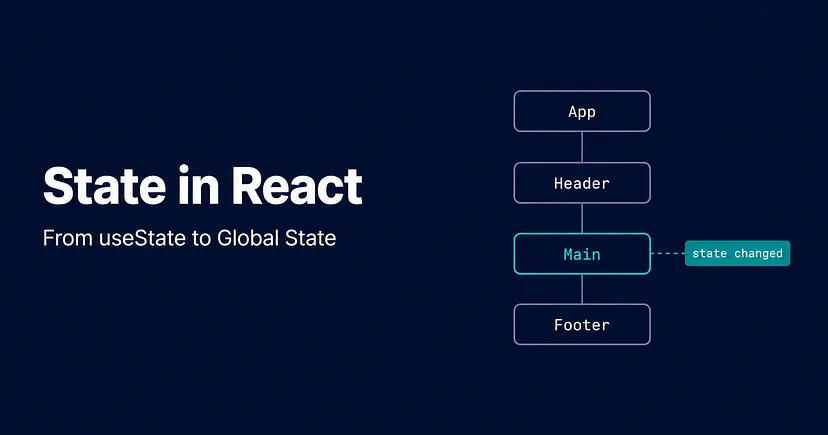
State is how React keeps track of those things that can change. When state changes, React automatically updates the UI to reflect it. Therefore, you don’t have to manually find the element and update it like you would in vanilla JavaScript, instead React handles that for you.
Think of state like a variable that React is watching. The moment it changes, React re-renders the component and the UI updates.
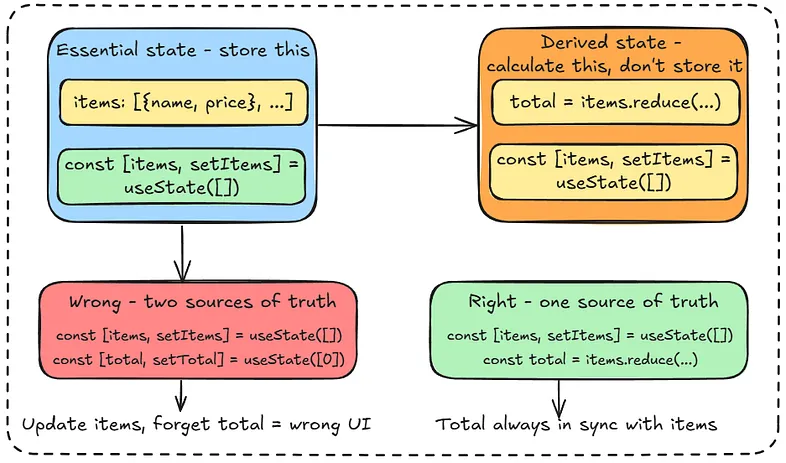
Now, not all state is equal. For example, take a shopping cart where you have a list of items, and you have a total price. Both of these can change, but they’re not the same kind of thing.
The list of items is essential state, meaning that it changes independently. The user adds something, removes something, you can’t calculate it from anything else. This is what you store.
The total price is derived state, it’s just the items added up. You don’t need to store it separately, you can calculate it from the items every time.
// ❌ storing derived state — two sources of truth
const [items, setItems] = useState([]);
const [total, setTotal] = useState(0);
// ✅ just calculate it from items
const [items, setItems] = useState([]);
const total = items.reduce((sum, item) => sum + item.price, 0);
If you store both, you have two sources of truth that can get out of sync. Update the items but forget to update the total, now your UI is showing the wrong number. That’s a bug you created by storing something you didn’t need to.
Three principles for state:
- Use as little state as possible — reserve it for interactivity only
- Place state as close as possible to where it’s used
- Only store essential state — compute derived state as needed
This is what makes React state predictable, as it behaves like a state machine. Given a specific state and a specific action, there’s always exactly one possible outcome. You can’t end up in a state you didn’t account for, which is what makes React UIs easier to reason about than manually updating the DOM.
The Reducer Pattern
For simple state, such as a counter, a toggle, a form field useState is fine and handles all of that cleanly.
But imagine you’re building a shopping cart where you can add items, remove items, update quantities, apply a discount code, clear the whole cart. That’s a lot of different ways the same piece of state can change. If you handle all of that with useState scattered across different components, things get messy fast.
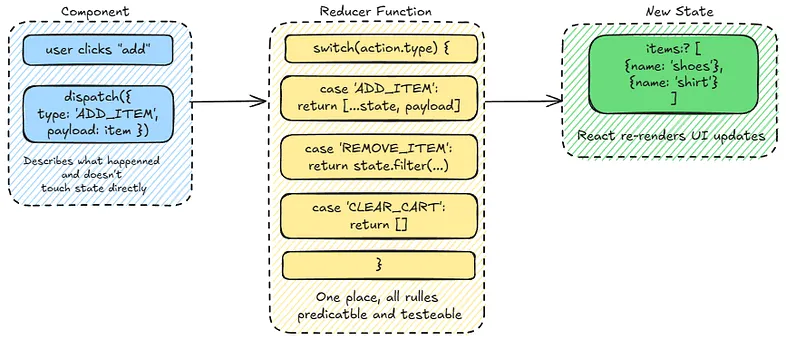
The reducer pattern solves this by centralising all that logic in one place. Instead of directly calling a setter, you dispatch an action that describes what just happened:
dispatch({ type: 'ADD_ITEM', payload: item })
dispatch({ type: 'REMOVE_ITEM', payload: itemId })
dispatch({ type: 'CLEAR_CART' })
A reducer function then decides how the state changes based on that action. All the rules live in one place, which ultimately are easier to understand, easier to test, harder to accidentally put state into an invalid combination.
Redux is built entirely on this pattern, just at a global scale.
Prop Drilling and Context
In React, components talk to each other through props. Props are just values you pass from a parent component down to a child — like arguments to a function. A parent has some data (props), it passes it down, the child uses it.
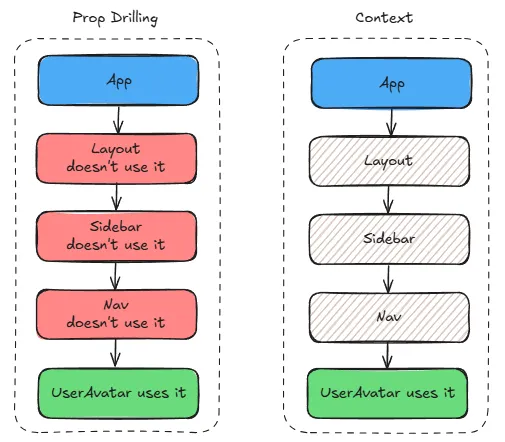
That works fine when you’re passing data one level down. But imagine you have data that lives at the top of your app — say, the logged in user — and you need it in a component that’s five levels deep. You’d have to pass it through every component in between, even the ones that don’t need it and are just passing it along. That’s prop drilling.
It creates bloated components that are harder to maintain and test. If that data ever changes shape, say you rename a property, you now have to update every single component in that chain, even the ones that were just passing it through and never actually used it.
Context API solves this. Instead of passing props through every level, you wrap part of your component tree in a Context provider. Any component inside that tree can access the data directly — no matter how deep it is.
The rule of thumb:
- Keep state as close as possible to where it’s used
- Lift it up to the lowest common ancestor when siblings need it
- Reach for Context when prop drilling gets bad
- Only then consider a third-party library if Context isn’t enough
The Observer Pattern and State Libraries
Context is great for sharing state across your component tree, but as apps get really complex, such as large scale applications with lots of moving parts, even Context can start to feel limiting. That’s when third-party state libraries like Redux or Zustand come in.
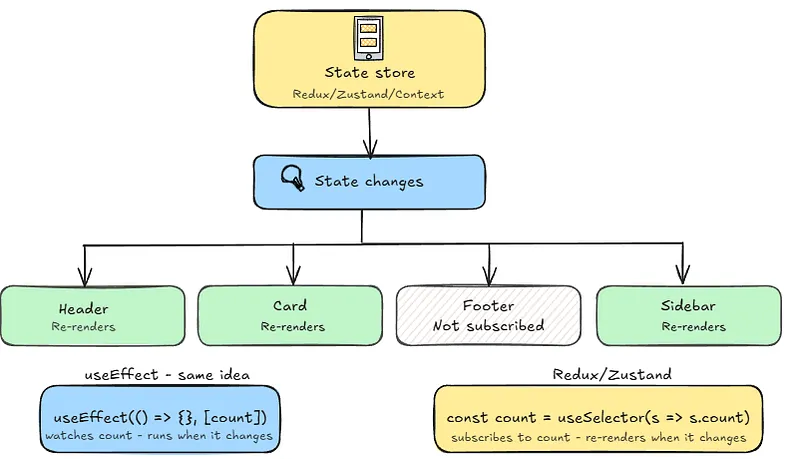
These libraries implement something called the observer pattern. The idea is that instead of manually telling each component to update when something changes, components subscribe to the state they care about. When that state changes, they get notified and re-render automatically.
You’ve might have actually already seen this pattern in React - useEffect with a dependency array works the same way. You tell React "watch these values, and when they change, run this."
Redux exists because React didn’t have Context API when it was created. Redux solved global state and prop drilling before React had native tools for it. Today most new projects reach for Context or lighter libraries like Zustand instead, but if you see Redux in an older codebase, now you know why it’s there.
State management is one of those things that starts simple and gets complex fast. The key is reaching for the right tool at the right time, not over-engineering from the start, and not under-engineering until things fall apart.
PS: This is based on my own research and understanding of how State works in React. I’d always recommend double checking other resources if you want to go deeper. I wrote this mostly for myself, but if it helps someone else along the way, that’s a win. Thanks for reading.