Understanding React — From Why It Exists to How It Actually Works
Before you can really understand React, it helps to understand why it exists in the first place. Not just “it’s a component framework”, but what problem it was actually solving when it was created.

Why React Exists
Before React came along, building complex UIs was done by writing a lot of jQuery or vanilla JavaScript code. And as applications grew, things started to fall apart pretty quickly.
DOM manipulation was unpredictable. Every time something changed such as a user clicked a button or data came back from an API, you had to manually find the right DOM elements and update them.
Code had no structure or reusability. If you built a dropdown or a modal, there was no clean way to reuse it and you’d end up copy pasting and maintaining the same thing in multiple places.
React came along and changed the way we think about UI. Instead of manually updating the DOM every time something changes, you just describe what the UI should look like for a given state and React handles the rest.
Component-Based Architecture
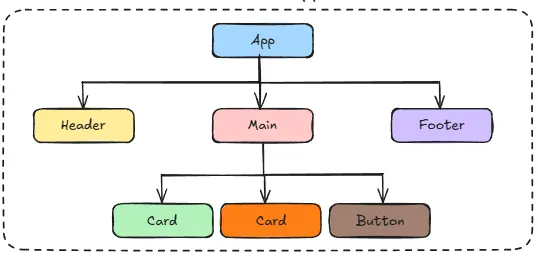
We split the UI into isolated and reusable components, where each component manages its own structure, styling and behaviour. That makes development faster and more reliable and you can unit test components individually and eliminate undesired side effects.
React is built on four patterns:
- OOP (Object Oriented Programming) — components as the main abstraction
- Declarative programming — simpler, readable component structures with JSX
- The state machine pattern — to model and manage data in a deterministic way
- Virtual DOM — to make UI reconciliation fast
OOP in React
React components are essentially objects, which means that they have their own data (state) and behaviour (methods/functions). These four OOP concepts map directly to how React components work:
Abstraction — think about how you use a <Button> component. You just pass it a label and an onClick handler and it works. You don't need to know how it handles hover states, disabled states, or styling internally. That's known as abstraction.
Encapsulation — a component’s state is private to that component. Think of a dropdown menu that manages its own open/closed state internally. Nothing outside can reach in and change it directly. The only way to interact with it is through the props you expose, like an onSelect callback. That's encapsulation — keeping the internals locked away and only exposing what's necessary.
Inheritance — in traditional OOP, inheritance means a child class takes on the properties and methods of a parent. In React this shows up with class components using extends, but it's actually discouraged in modern React.
This is because the child is now dependent on the parent’s implementation. If you change the parent, you risk breaking all the children that extend it.
The React team themselves recommend using composition over inheritance. This means that instead of extending a component, you wrap it or pass things into it as props. So while inheritance exists, you'll rarely use it intentionally in React.
Polymorphism — think about a <Button> component. You use the same component everywhere in your app but it looks and behaves differently depending on what props you pass it. A confirm button, a delete button, a disabled button — all the same component, just different props.
Declarative vs Imperative
This is one of the most important mental shifts when moving from vanilla JavaScript to React. So what do these two terms mean?
Vanilla JavaScript and jQuery are imperative, meaning that when you write code you tell the computer every step. “Find this element, change this class, update this text.” You’re in charge of how it happens.
// Imperative — vanilla JS
// you manually find the element and update it yourself
const btn = document.getElementById('like-btn');
btn.addEventListener('click', () => {
const count = document.getElementById('count');
count.textContent = parseInt(count.textContent) + 1;
});
On the other hand, React is declarative, meaning that you just describe what you want the UI to look like and React figures out how to get there. You stop worrying about the steps and just say “when this state is true, the UI should look like this.”
// Declarative — React
// you just describe what the UI should look like
function LikeButton() {
const [likes, setLikes] = useState(0);
return <button onClick={() => setLikes(likes + 1)}>{likes} likes</button>;
}
State
When you’re building a UI component, some things change and some things don’t. For example, a page title doesn’t change, but a like count does.
State is how React keeps track of those things that can change. When state changes, React automatically updates the UI to reflect it. Therefore, you don’t have to manually find the element and update it like you would in vanilla JavaScript, instead React handles that for you.
Think of state like a variable that React is watching. The moment it changes, React re-renders the component and the UI updates.
Now, not all state is equal. For example, take a shopping cart where you have a list of items, and you have a total price. Both of these can change, but they’re not the same kind of thing.
The list of items is essential state, meaning that it changes independently. The user adds something, removes something, you can’t calculate it from anything else. This is what you store.
The total price is derived state — it’s just the items added up. You don’t need to store it separately, you can calculate it from the items every time.
// ❌ storing derived state — two sources of truth
const [items, setItems] = useState([]);
const [total, setTotal] = useState(0);
// ✅ just calculate it from items
const [items, setItems] = useState([]);
const total = items.reduce((sum, item) => sum + item.price, 0);
If you store both, you have two sources of truth that can get out of sync. Update the items but forget to update the total, now your UI is showing the wrong number. That’s a bug you created by storing something you didn’t need to.

Essential vs Derived State
Three principles for state:
- Use as little state as possible — reserve it for interactivity only
- Place state as close as possible to where it’s used
- Only store essential state — compute derived state as needed
The Reducer Pattern
For simple state, such as a counter, a toggle, a form field useState is fine and handles all of that cleanly.
But imagine you’re building a shopping cart where you can add items, remove items, update quantities, apply a discount code, clear the whole cart. That’s a lot of different ways the same piece of state can change. If you handle all of that with useState scattered across different components, things get messy fast.
The reducer pattern solves this by centralising all that logic in one place. Instead of directly calling a setter, you dispatch an action that describes what just happened:
dispatch({ type: 'ADD_ITEM', payload: item })
dispatch({ type: 'REMOVE_ITEM', payload: itemId })
dispatch({ type: 'CLEAR_CART' })
A reducer function then decides how the state changes based on that action. All the rules live in one place, which ultimately are easier to understand, easier to test, harder to accidentally put state into an invalid combination.
Redux is built entirely on this pattern, just at a global scale.

The Virtual DOM and Reconciliation
When you interact with a webpage, such as clicking a button, typing in a form, something on the screen needs to update. To make that happen, the browser has to touch the DOM and that’s not cheap. Every time it does, the browser has to recalculate layouts, repaint elements, recomposite layers. The more of that happening at once, the slower things get.
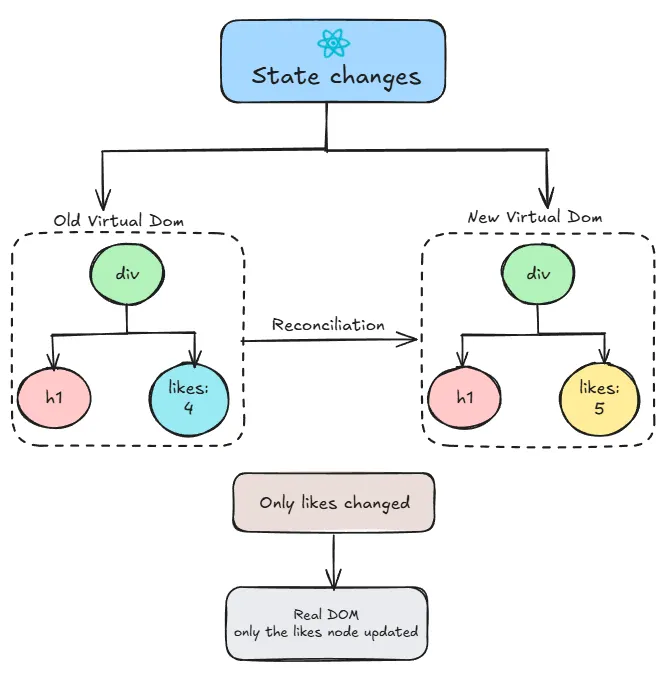
React’s solution to this problem is the Virtual DOM. Instead of touching the real DOM every time something changes, React keeps a lightweight copy of it in memory — a JavaScript object that mirrors the structure of your actual page.
Here’s what happens when state changes:
- React builds a new virtual DOM based on the new state
- It compares that with the previous virtual DOM — this is called reconciliation
- It figures out the minimum number of changes needed
- Only then does it touch the real DOM — and only the parts that actually changed
Prop Drilling and Context
In React, components talk to each other through props. Props are just values you pass from a parent component down to a child — like arguments to a function. A parent has some data (props), it passes it down, the child uses it.
That works fine when you’re passing data one level down. But imagine you have data that lives at the top of your app — say, the logged in user — and you need it in a component that’s five levels deep. You’d have to pass it through every component in between, even the ones that don’t need it and are just passing it along. That’s prop drilling.
It creates bloated components that are harder to maintain and test. If that data ever changes shape, say you rename a property, you now have to update every single component in that chain, even the ones that were just passing it through and never actually used it.
Context API solves this. Instead of passing props through every level, you wrap part of your component tree in a Context provider. Any component inside that tree can access the data directly — no matter how deep it is.
The rule of thumb:
- Keep state as close as possible to where it’s used
- Lift it up to the lowest common ancestor when siblings need it
- Reach for Context when prop drilling gets bad
- Only then consider a third-party library if Context isn’t enough

The Observer Pattern and State Libraries
Context is great for sharing state across your component tree, but as apps get really complex, such as large scale applications with lots of moving parts, even Context can start to feel limiting. That’s when third-party state libraries like Redux or Zustand come in.
These libraries implement something called the observer pattern. The idea is that instead of manually telling each component to update when something changes, components subscribe to the state they care about. When that state changes, they get notified and re-render automatically.
You’ve might have actually already seen this pattern in React — useEffect with a dependency array works the same way. You tell React "watch these values, and when they change, run this."
A quick note on Redux — it exists because React didn’t have Context API when it was created. Redux solved global state and prop drilling before React had native tools for it. Today most new projects reach for Context or lighter libraries like Zustand instead, but if you see Redux in an older codebase, now you know why it’s there.

The Component Lifecycle
Every React component goes through three phases:
Mount — the component appears on screen for the first time. Think of it like a component being created. React creates it, adds it to the DOM, and it’s now visible. Any useEffect with an empty dependency array fires after this — it's your chance to do something once when the component first appears, like fetching data or starting a timer.
Update — something changes. State updates, new props come in. React re-renders the component, diffs the new virtual DOM against the old one, and updates only what changed on screen.
Unmount — the component is removed. Maybe the user navigated away, maybe a condition changed and it’s no longer needed. React removes it from the DOM. Before it does, any cleanup functions in useEffect run — this is your chance to tidy up anything the component was doing.
A good example is a timer:
function Timer() {
const [seconds, setSeconds] = useState(0);
useEffect(() => {
// MOUNT - start the timer
const interval = setInterval(() => {
setSeconds((s) => s + 1);
}, 1000);
// UNMOUNT - stop the timer when component disappears
return () => clearInterval(interval);
}, []);
return <p>{seconds} seconds</p>;
}
When the Timer mounts, the interval starts counting. When it unmounts, the cleanup function runs and clears the interval. Without that cleanup, the interval keeps running in the background even after the component is gone, which is also known as memory leak.

React has a lot of moving parts, and it can feel overwhelming when you’re trying to understand it all at once. But once the mental models click — UI as a function of state, components as isolated building blocks, the Virtual DOM doing the heavy lifting behind the scenes, everything else starts to make sense.
PS: This is based on my own research and understanding of how core concepts in React work. I’d always recommend double checking other resources if you want to go deeper. I wrote this mostly for myself, but if it helps someone else along the way, that’s a win. Thanks for reading.